

ExplainerWindows and Mac

Browser fingerprinting: which data can a website see?

A guide by Mantis Browser: examples use our own app.

Understand user agent, screen data, fonts, canvas and WebGL without confusing a fingerprint with an account, cookie or IP address.

Updated 2 min readLeer en español

A fingerprint combines signals#

A website can observe browser and environment properties and combine them with visit information. Fingerprinting describes that combination; it does not imply one fixed string that every site reads in the same way. MDN’s definition provides a starting point.

Cookies, IP and the signed-in account are separate signals. Changing a visible property does not remove a stored cookie identifier or the account information you signed in with. A browser test does not reveal everything a particular service uses to make decisions.

What a diagnostic may show#

DataWhat it represents
User agent and version informationBrowser and platform identification reported by the connection.
Screen and scaleDimensions and the relationship between physical and CSS pixels.
Canvas and audioResults of operations a website can measure.
WebGL and fontsRendering characteristics and available environment resources.
Language and time zoneReported preferences and regional context.

Compare fields, not just a score#

  1. Record browser version, monitor, scale, proxy and test date.
  2. Run the same page twice without changing settings and record differing fields.
  3. Repeat after changing only one option. An engine update may also alter results.
  4. Check the task you actually need: a favorable test result does not guarantee acceptance on another website.

What a Mantis profile configures#

Mantis generates identity settings when creating a profile and lets you review them. Resolution and scale use the client’s monitor as a reference; changing monitors may change visible screen information. Reported memory and CPU do not add physical resources to the PC.

See fingerprint and hardware to distinguish real and configured modes. Keep an explainable project configuration and avoid randomly changing an active profile just to chase a test score.
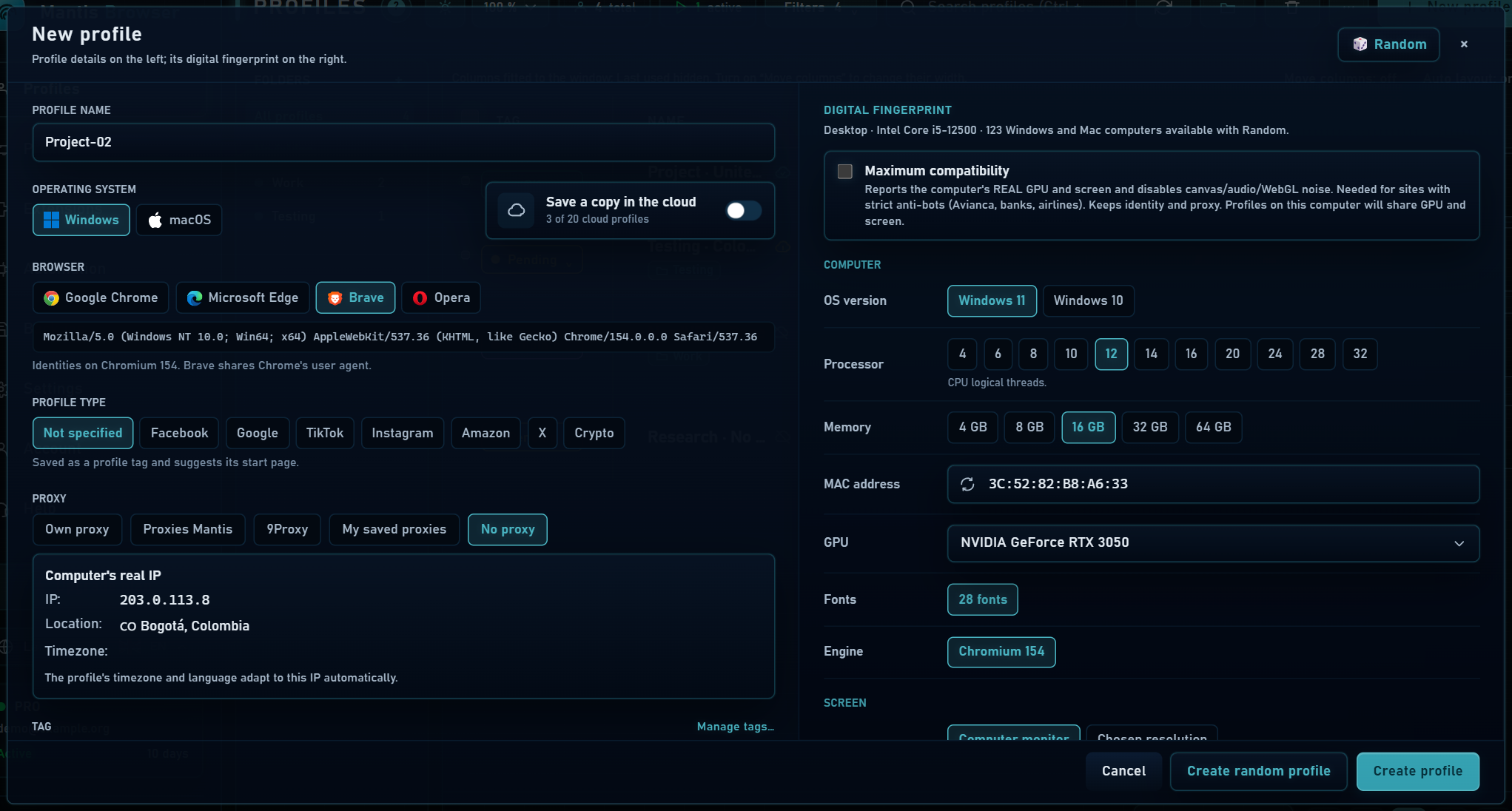
System, browser and user agent of a Mantis profile.System, browser and user agent of a Mantis profile.
Real interface · Example data Review profile data before interpreting a test. Selecting an identity does not change the system on which the app installs.

Put the guide into practice with Mantis

If you need to organize projects on Windows or Mac, try Mantis with 5 profiles on 1 computer, with no card or expiry. Advanced features such as API/CDP, bulk creation and backups depend on your plan; check the limits before buying.

If you would rather stick with what you already use, keep the organization part: it applies just the same.

Continue in the manual

Profile fingerprint and hardwareWhere your data is storedOwn proxy and My saved proxies

Cookies and storage

Necessary: used when you choose a language, sign in or buy. Disabling them affects those features; you can clear them through your browser.

Optional first-party statistics: daily totals by page and campaign, retained for 180 days. No stored IP addresses or visitor identifiers (if you arrive from an ad, a hashed code of your connection for 7 days to attribute the signup in the app). These first-party statistics are not sent to Google. The campaign is remembered only in this tab if you accept. You can reject or withdraw your choice here; website features remain available.

Google receives technical data (IP address, browser and ad click), verified signups and confirmed purchases (order reference, amount and currency). We send no emails, passwords or browser profile data. Ad personalization requires the additional option below. We use no enhanced conversions. Its tag loads only if you accept this option.

Allows ads on Google, YouTube, Facebook and Instagram based on your website visits and interactions. Includes the Google measurement above and the Meta pixel for visits, downloads, verified signups and confirmed purchases. Meta receives IP address, browser, advertising identifiers and website events; never emails, passwords or browser profile data. You can withdraw permission here.

Only with this option, TikTok receives visits, downloads, verified signups and confirmed purchases through its pixel and Events API. Includes IP address, browser, ad identifiers, order reference, amount and currency; never emails, passwords or browser profile data. This permission is independent of Google and Meta and can be withdrawn here.

Read the full policy